How To Login
Login guide for Next+ and Castora
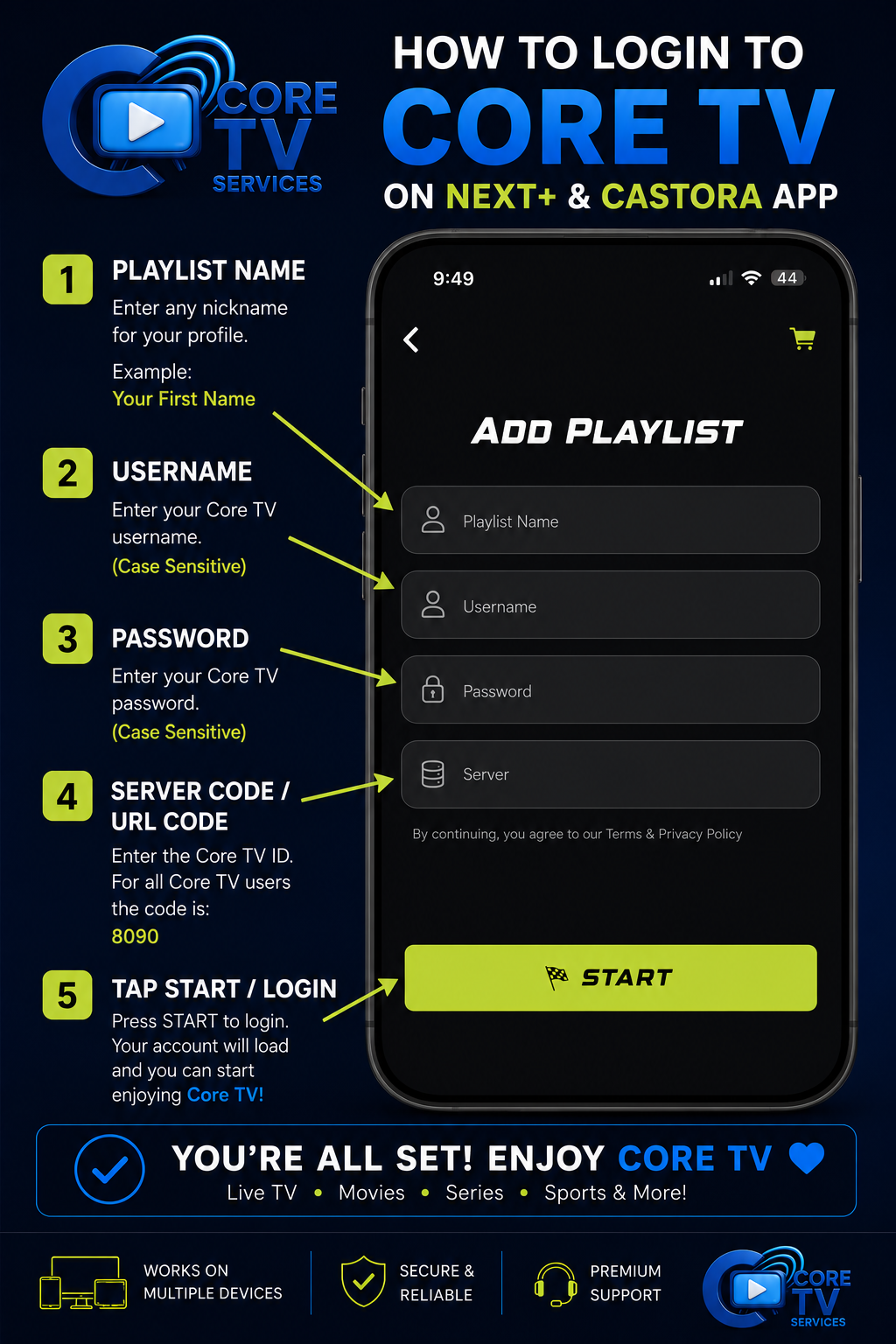
This login guide applies to all Core TV recommended applications:
Login Instructions
Open Your App
Open the Next+ or Castora application on your device.
Add Playlist
Press "Add Playlist" to bring up the login screen.
Playlist Name
Enter any nickname for your playlist. This is just for your reference.
JohnYou can name this anything you want.
Username
Enter your Core TV username provided in your activation email.
Your_Username⚠️ Case sensitive — enter exactly as provided
Password
Enter your Core TV password provided in your activation email.
Your_Password⚠️ Case sensitive — enter exactly as provided
Server Code / URL Code
Enter the Core TV server number for all customers:
8090This is the same server code for all Core TV customers.
Start Watching!
Start Watching! Press Start or Login and your account will load. Core TV is ready to use!
Some Areas Work Best With a VPN
If you experience buffering or connection issues, a VPN can help ensure smooth streaming. We recommend Proton VPN — fast, secure, and works great with IPTV services.